



The supply chain generates more data than any team can reasonably analyse. Every shipment, every inspection, every scan at a warehouse dock creates structured event data — but turning that data into decisions has traditionally required SQL skills, BI tool expertise, or waiting for someone else to pull a report.
What if you could simply ask a question and get an answer?
In this post: 1. Why supply chain data is harder to query than it looks 2. What happens when you ask a standards-aware AI a real question 3. Why generic AI models get supply chain queries wrong 4. Where this delivers immediate value
The data problem across the full supply chain
Supply chain data doesn't live in one place or follow one format. Upstream, you have raw material certifications and supplier audits. In manufacturing, you have production events, quality checks, and batch records. Logistics generates shipping events, temperature logs, and customs documentation. At the consumer end, there's engagement data from QR code scans and Digital Product Passports. And increasingly, there's end-of-life data from recycling and circular economy programmes.
Each stage produces valuable information. The challenge isn't collecting it — modern traceability systems like EPCIS repositories handle that well. The challenge is making sense of it all without needing a data team on standby.
What a real supply chain AI query looks like
This is where it gets concrete. Say you're a quality manager at a food company, and you need to answer this question:
"Which batches from our Italian tomato supplier were involved in shipments that arrived after their best-before date in Q4?"
That's a straightforward question for a human to understand. But answering it requires traversing multiple layers of supply chain event data. Let's walk through what the AI actually does.
First, it identifies the supplier — looking up the trading partner by name or GLN (Global Location Number) in the EPCIS repository. Then it finds all ObjectEvent records with a bizStep of urn:epcglobal:cbv:bizstep:shipping linked to that supplier during Q4. Each of those events contains an epcList — the GTINs and batch/lot numbers for every product in the shipment.
Next, it follows the chain. For each shipment, the AI looks for the corresponding ObjectEvent with a bizStep of urn:epcglobal:cbv:bizstep:receiving — the moment those goods arrived at your facility. It pulls the timestamp from the receiving event.
Finally, it cross-references the batch master data. The ilmd (instance/lot master data) section of the original commissioning event contains the best-before date for each batch. The AI compares receiving timestamps against best-before dates and returns the results:
| Batch | GTIN | Shipped | Received | Best-before | Days overdue |
|---|---|---|---|---|---|
| LOT-2025-IT-0847 | 08001234567890 | 2025-10-12 | 2025-10-29 | 2025-10-25 | 4 |
| LOT-2025-IT-0923 | 08001234567890 | 2025-11-03 | 2025-11-22 | 2025-11-18 | 4 |
| LOT-2025-IT-1102 | 08001234567890 | 2025-12-01 | 2025-12-19 | 2025-12-15 | 4 |
Three batches, all from the same supplier, all arriving four days past their best-before date. That's not a coincidence — it's a shipping route problem. The AI just surfaced it in seconds. A manual investigation through dashboards and spreadsheets would have taken your team days to piece together.
If you want to understand the event types and fields the AI is working with here, our guide to GS1 EPCIS 2.0 covers the full structure in detail.
From dashboards to conversations
Traditional business intelligence tools give you dashboards. Dashboards are useful when you know exactly what you want to monitor — but they fall short when you have an unexpected question. "Which batches from supplier X were processed at facility Y last month?" isn't something you can answer from a pre-built dashboard.
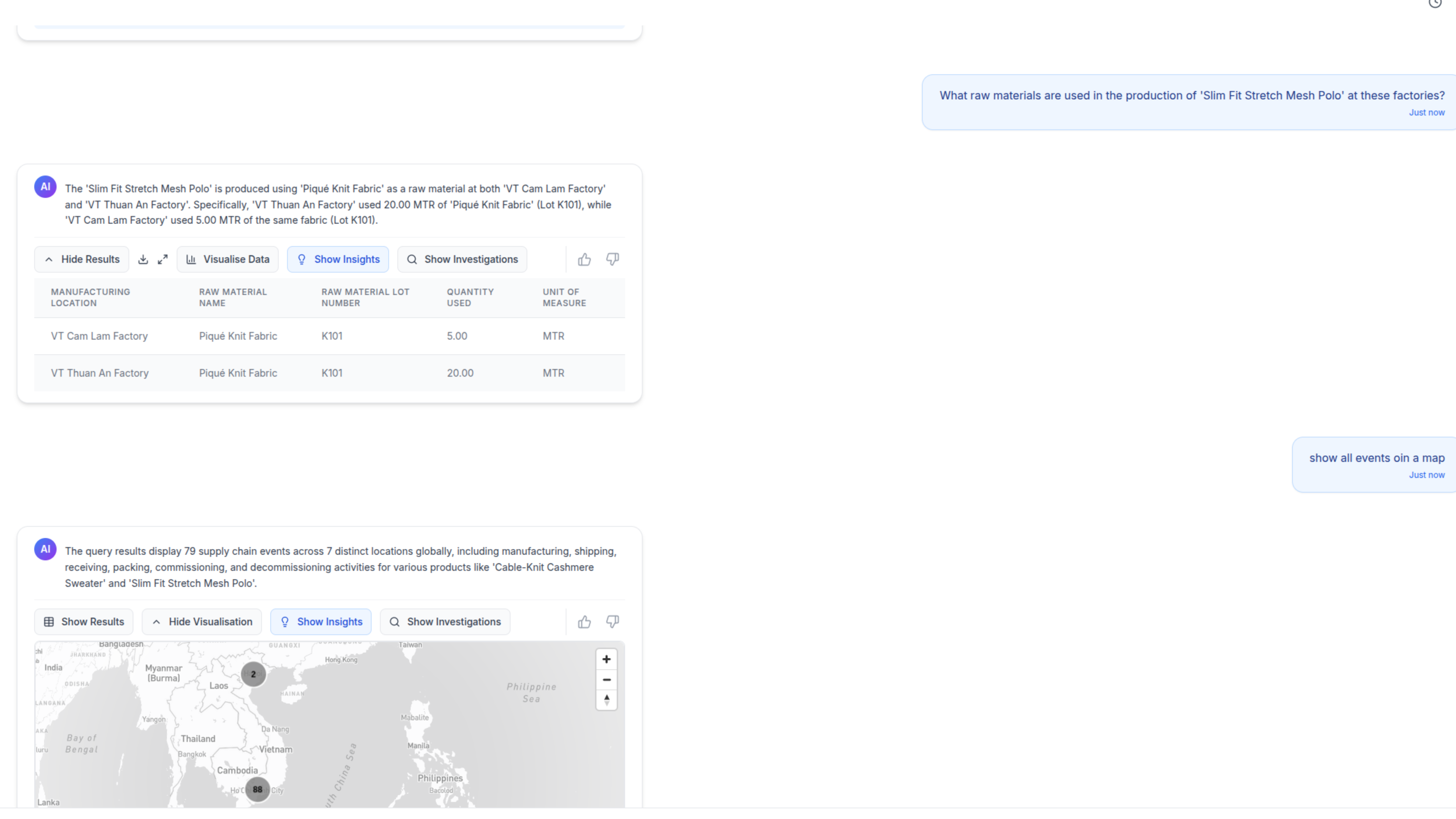
AI-powered conversational analysis changes this. Instead of building queries or navigating dashboard filters, you ask questions in plain English:
- "Show me all shipments from our Italian supplier that arrived late in Q4"
- "What's the average time between harvest and retail shelf for our organic line?"
- "Which production batches had the highest reject rates this year, and what raw materials did they share?"
The AI interprets your question, queries the underlying EPCIS events, and returns results — often as a chart or table you can immediately share with your team.
Why generic AI falls short
You might wonder why you can't just connect ChatGPT to your supply chain database and get the same result.
The answer is vocabulary. Supply chain data follows specific standards and structures. EPCIS events have business steps, dispositions, and event types that carry specific meaning. A bizStep of urn:epcglobal:cbv:bizstep:shipping is fundamentally different from urn:epcglobal:cbv:bizstep:receiving, even though both involve the same product moving between locations. An AggregationEvent means items were packed together. A TransformationEvent means raw materials became a finished product.
Ask a generic model "which batches expired in transit?" and it doesn't know that expiry dates live in the ilmd field of a commissioning event. It doesn't understand that "in transit" means the window between a shipping ObjectEvent and a receiving ObjectEvent. It can't traverse the relationship between a GTIN, a lot number, and the chain of events those identifiers appear in.
A specialised AI agent — one built on GS1 supply chain data models — understands this vocabulary natively. It knows how to traverse the relationships between events, products, locations, and trading partners. When you ask "which products from batch 2847 have reached end consumers?", it knows to look for ObjectEvent records with a bizStep of urn:epcglobal:cbv:bizstep:retail_selling or Digital Product Passport scan events linked to that batch.
Real-world applications
Here's where conversational supply chain analysis delivers immediate value:
Recall investigations — When a quality issue surfaces, trace affected products across the entire supply chain in minutes rather than days. The AI follows AggregationEvent and TransformationEvent chains to identify every downstream product that shares a common input batch. Ask follow-up questions to narrow the scope: "Of those affected batches, which ones have already reached retail?"
Supplier performance — Compare supplier delivery times, quality metrics, and compliance records without building a custom report. The AI calculates the delta between shipping and receiving ObjectEvent timestamps across hundreds of shipments and flags outliers — like three batches from the same supplier all arriving four days late.
Regulatory compliance — Generate the reports that EU DPP regulations and other compliance frameworks require. The AI pulls data from commissioning events, transformation events, and quality inspection records into a single coherent view, mapping each data point to its regulatory requirement.
How TrackVision helps
TrackVision's AI agent is purpose-built for supply chain data analysis. It sits on top of our EPCIS repository and understands the full GS1 standards vocabulary — event types, business steps, dispositions, and the relationships between them.
You don't need to learn SQL or wait for your IT team to build a report. Open a conversation, ask your question, and get your answer — with every data point traceable back to the specific EPCIS event that recorded it.
If your supply chain data is locked in dashboards that only answer yesterday's questions, it might be time to start asking new ones.
Learn more about TrackVision's AI capabilities or get in touch to see it in action with your own data.